MC3-4JMRI
Manifest Creator - JMRI 'Look A Like' Last updated 11/09/23
NOTE: MC3-4JMRI includes the ability to show car images on your manifests.
NOTE: This version of Manifest Creator has a companion Location List Creator (LLC) for JMRI "switch lists". It is available to download below and is named LLC3-4JMRI. NOT YET UPDATED TO 7.04 ... coming soon.
Manifest Creator 3 (MC3-4JMRI) - Is a look a like to the JMRI default manifest. It was requested by a user who was having difficulty making the JMRI default behave in a manner that he wanted. Since that time, it has grown in capabilities to become the "flagship' App for flexibility and user control in the flotilla of Manifest Creators.
This Creator is a recent addition. It has significant user flexibility in format, information inclusion or exclusion. The documentation lags behind so if you are interested in further information about this new format, please use the Contact Author page and send a message in that regard. There is a beginning of the documentation for download below. It mostly discusses the Preferences available in MC3.
=============================================================================
This Creator is a recent addition. It has significant user flexibility in format, information inclusion or exclusion. The documentation lags behind so if you are interested in further information about this new format, please use the Contact Author page and send a message in that regard. There is a beginning of the documentation for download below. It mostly discusses the Preferences available in MC3.
=============================================================================
Current Version 7.04 as of 11/04/23
Reviewed code to collect all special updates to get things back in sync. No major changes.
==============================================================================
Current Version 6.02a as of 06/10/20
Added capability for user to select where MC generated output files are to be saved. There are four options that are found in the Preference file MC3_4JMRI_PrefMast.xls. This is an update to the Preference file and requires downloading the update PrefMast file as well as the Application. The four options are set at Output Manifest File Folder and include:
=============================================================================
Version 6.02 as of 06/23/19
Added DCC Address on Pickup Loco Record - both at a specific line or under the PL record on the Manifest based on Preference settings.
Fixed issue with Remove Asterisk routine.
No changes to the MC3-4JMRI_PrefMast.
=============================================================================
Download the Control File and appropriate Application and place them in your csvManifests folder (or wherever you store your CSV files from JMRI)
NOTE: If you will be using car images the folder to house these images is csvImages and is at the same level as csvManifests
Please Use Contact Us to ask for the 600 or so that have been gathered to date.
Reviewed code to collect all special updates to get things back in sync. No major changes.
==============================================================================
Current Version 6.02a as of 06/10/20
Added capability for user to select where MC generated output files are to be saved. There are four options that are found in the Preference file MC3_4JMRI_PrefMast.xls. This is an update to the Preference file and requires downloading the update PrefMast file as well as the Application. The four options are set at Output Manifest File Folder and include:
- 0-Save in same location as the JMRI files
- 1 - Ask each time a Manifest is created
- 2 - Ask first time only and keep files in the selected directory
- 3 - Ask first if you would like to select a different location
=============================================================================
Version 6.02 as of 06/23/19
Added DCC Address on Pickup Loco Record - both at a specific line or under the PL record on the Manifest based on Preference settings.
Fixed issue with Remove Asterisk routine.
No changes to the MC3-4JMRI_PrefMast.
=============================================================================
Download the Control File and appropriate Application and place them in your csvManifests folder (or wherever you store your CSV files from JMRI)
NOTE: If you will be using car images the folder to house these images is csvImages and is at the same level as csvManifests
Please Use Contact Us to ask for the 600 or so that have been gathered to date.
Program Files
WARNING: It appears that some browser or operating systems are converting the .xlsm extension to xlsx. The MC contains macro code and at times folks use this to infiltrate your system. If you have issues and see that the extension has been changed to .xlsx, you will need to 'rename" the file and change the extension from .xlsx to .xlsm. If this does occur, I would like to know what browser and operating system you used when downloading the file. NOTE: .xls versions are not affected.
WARNING: With the increase in security you need to change the properties of files that you download. To do this Right-Click on the file, select Properties from the POP-UP menu - it is at the bottom of the list - then select the Unblock check box. See image below.
WARNING: With the increase in security you need to change the properties of files that you download. To do this Right-Click on the file, select Properties from the POP-UP menu - it is at the bottom of the list - then select the Unblock check box. See image below.
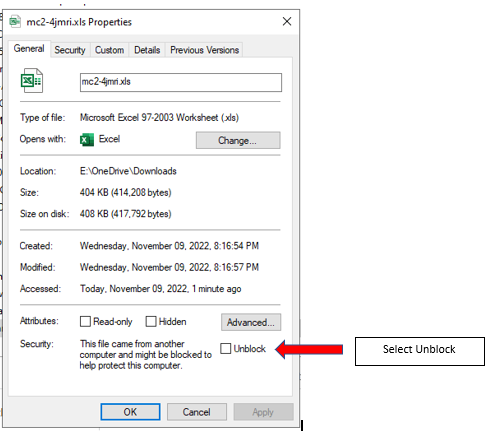
|
Manifests
Excel 2007 and above
Required for Excel 2013 and above Excel 2010 and below Default JMRI Logo Sample CSV File to use when first trying Manifest Creator (MC3)
VERY early start of Documentation
View File |
Application


|
Control File
Same Control File
Same for all "Creators" Same for all Manifest Creators
Same for all "Creators" Same for MC3 & LLC3
| ||||||||||||||
LLC3-4JMRI
Location List Creator 3 - JMRI - 'Look A Like' Last updated 11/17/21
The Location List Creator is yet to be modified as was done with Manifest Creator. It will be coming soon. (11/09/23)
Location List Creator 3 (JMRI Switch Lists) - is HERE!
LLC3-4JMRI is the "sister" program to MC3-4JMRI. I will produce Location List from the CSV Files that are generated when JMRI builts its switch lists. The same flexibility and functionality as exists for MC3-4JMRI (above) is available in LLC.
Current Version 5.04 as of 11/17/21
Versioning issue corrected.
Renamed to LLC3-4JMRI and made necessary changes
Changed the LLC footer line
Made individual lines for DL,DT,ETA,TA,TD - Will put back into one or two lines with combined info
Using MC3 and LLC3 Combined routines - Variables now
Current Version 6.01 as of 06/18/19 (5.01-)
Changed the numbers provided on the end of train information. Only report Pulls and Sets as other numbers are not accurate.
Current Version 6.00 as of 04/04/19 (5.00)
Rename to MC3-4JMRI with some additional enhancements.
Versioning issue corrected.
Renamed to LLC3-4JMRI and made necessary changes
Changed the LLC footer line
Made individual lines for DL,DT,ETA,TA,TD - Will put back into one or two lines with combined info
Using MC3 and LLC3 Combined routines - Variables now
Current Version 6.01 as of 06/18/19 (5.01-)
Changed the numbers provided on the end of train information. Only report Pulls and Sets as other numbers are not accurate.
Current Version 6.00 as of 04/04/19 (5.00)
Rename to MC3-4JMRI with some additional enhancements.
Version 4.3e as of 06/07/18
The code for SLICII and SLCIII have been combined. SLIC allowed for the inclusion of Car Images on the Location List. There is now a Preference to indicate if images should be included or not. This eliminates one more set of code that I need to keep up to date. Yea!! At this point SLICII still exists but is the same as SLCIII. Soon SLICII will be retirted.
NOTE: 09/24/18
SLICII4JMRI does not exist on it's own any longer, It was identical to SLCIII4JMRI with the exception of Images. At this point, Car/Loco images may be included or not based upon a Preference setting.
WARNING: It appears that some browser or operating systems are converting the .xlsm extension to xlsx. The MC contains macro code and at times folks use this to infiltrate your system. If you have issues and see that the extension has been changed to .xlsx, you will need to 'rename" the file and change the extension from .xlsx to .xlsm. If this does occur, I would like to know what browser and operating system you used when downloading the file. NOTE: .xls versions are not affected.
Program Files
|
Switch Lists
Excel 2007 and above
Required for Excel 2013 and above Excel 2010 and below
Default JMRI Logo
Sample CSV File to use when first trying Location List Creator (LLC3)
|
| ||||||||||||||
|
Same for all "Creators"
| |||
|
Same for MC3 & LLC3
| |||
